Microsoft Clarity · Status at source date: Newsletter archive
Microsoft Clarity adds conversion impact tab to heatmaps
Microsoft Clarity has released a Conversion tab in its heatmaps tool, showing the percentage of sessions that converted after interacting with a specific element or section on a page. Previously, heatmaps showed attention and click data but provided no direct link to conversion outcome: making it impossible to determine whether a specific component was contributing to or suppressing sales.
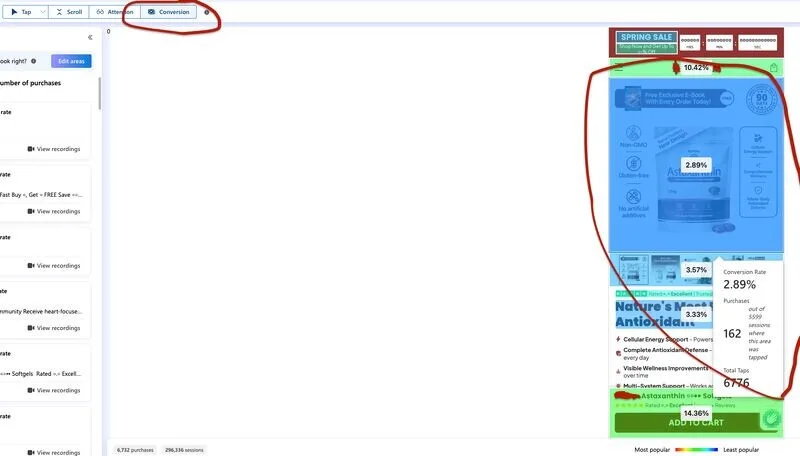
What changed
The feature is free and available as a Shopify app.
Why it matters for advertisers
For you, this means identifying which page elements are receiving close attention but converting poorly: the gap between interaction rate and conversion rate per element is now a direct brief for A/B testing priorities rather than a subjective judgment call.
Perspective from the original PMC newsletter.Sources & contributor credit
- Newsletter coverage · Paid Media Collective newsletter
Original newsletter text, contributor labels and media for this update.
- Source referenced in newsletterLinkedIn
Linked from the original newsletter. The source publication date has not been independently confirmed.
Original creator unverified
The names below are source credits. The original creator and first-reporting priority have not yet been independently verified.
Attribution evidence and limitations
Full attribution review pending.
A source link alone does not establish original authorship.
Original image and video creators have not yet been verified.
- Published on this site
This update reflects the dated source reporting. Availability may have changed. Further coverage of this same development will be added to this page.
Original newsletter text and archive evidence
Microsoft Clarity adds conversion impact tab to heatmaps
Microsoft Clarity has released a Conversion tab in its heatmaps tool, showing the percentage of sessions that converted after interacting with a specific element or section on a page. Previously, heatmaps showed attention and click data but provided no direct link to conversion outcome: making it impossible to determine whether a specific component was contributing to or suppressing sales. The feature is free and available as a Shopify app.
For you, this means identifying which page elements are receiving close attention but converting poorly: the gap between interaction rate and conversion rate per element is now a direct brief for A/B testing priorities rather than a subjective judgment call.
Source captured . No explicit first-contributor label was provided for this update.