Amazon Ads · Status at source date: Newsletter archive
Amazon Bulk Operations renames all export files to "BulkSheetExport"
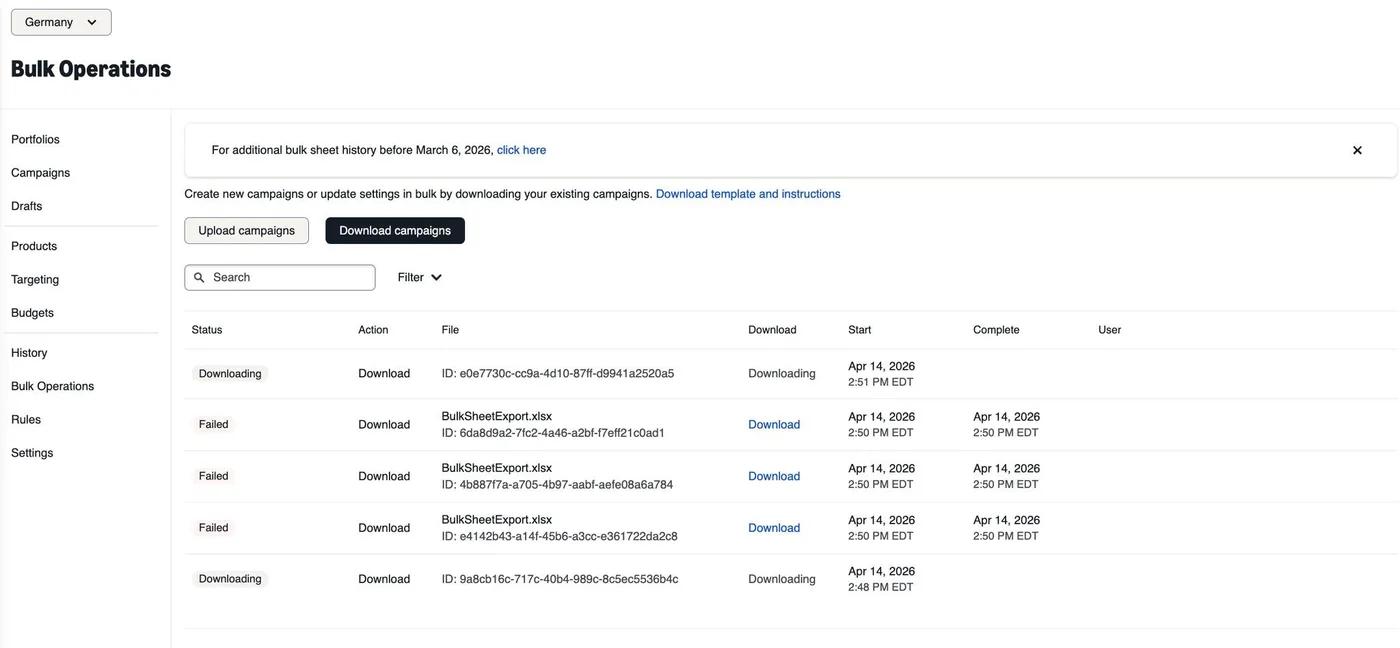
Alexander Swade has flagged a regression in Amazon Ads Bulk Operations: export files previously included the date range in the filename, making it straightforward to identify which timeframe a file covered. The download is now always named "BulkSheetExport" regardless of settings.
What changed
A user column has been added to the export table to indicate which team member requested the file, but Swade reports that the column remains empty. The change creates friction for teams working with multiple bulk files across different accounts or timeframes.
Why it matters for advertisers
For you, this means establishing a manual file-renaming convention immediately if your workflow depends on filename-based file identification: and submitting feedback to Amazon, requesting the date range be reinstated in the filename.
Perspective from the original PMC newsletter.Sources & contributor credit
- Newsletter coverage · Paid Media Collective newsletter
Original newsletter text, contributor labels and media for this update.
- Source referenced in newsletterLinkedIn
Linked from the original newsletter. The source publication date has not been independently confirmed.

Original creator unverified
The names below are source credits. The original creator and first-reporting priority have not yet been independently verified.
Attribution evidence and limitations
Full attribution review pending.
A source link alone does not establish original authorship.
Original image and video creators have not yet been verified.
- Published on this site
This update reflects the dated source reporting. Availability may have changed. Further coverage of this same development will be added to this page.
Original newsletter text and archive evidence
Amazon Bulk Operations renames all export files to "BulkSheetExport"
Alexander Swade has flagged a regression in Amazon Ads Bulk Operations: export files previously included the date range in the filename, making it straightforward to identify which timeframe a file covered. The download is now always named "BulkSheetExport" regardless of settings. A user column has been added to the export table to indicate which team member requested the file, but Swade reports that the column remains empty. The change creates friction for teams working with multiple bulk files across different accounts or timeframes.
For you, this means establishing a manual file-renaming convention immediately if your workflow depends on filename-based file identification: and submitting feedback to Amazon, requesting the date range be reinstated in the filename.
Source captured . No explicit first-contributor label was provided for this update.