Google Ads · Status at source date: Newsletter archive
Policy Manager moves into Admin and adds an Ads tab
Google has moved Policy Manager from Tools > Troubleshooting to Admin > Policy and added an Ads view beside the existing account-level controls. The change centralises limited and disapproved ad statuses without introducing a new enforcement standard.
What changed
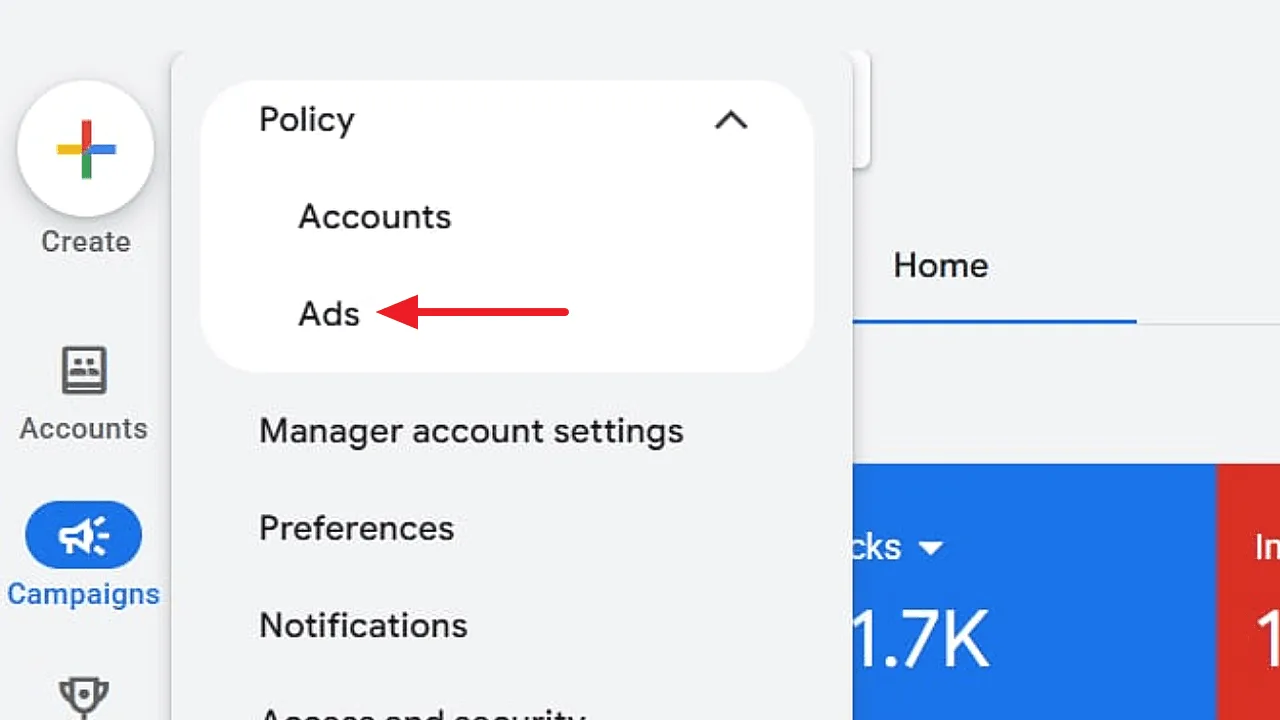
PPC News Feed's report describes Policy Manager moving from Tools > Troubleshooting to Admin > Policy in Google Ads. It also identifies an Ads tab alongside the account view used for verifications and certifications. The article credits Vojtěch Audy with sharing the update, matching the contributor preserved in the newsletter archive. The attached image confirms the separate Accounts and Ads entries in the Policy menu.
The change is operational navigation. The reviewed report does not announce a new advertising rule or claim that a limited or disapproved ad will receive a different decision because of the move. Teams should therefore update where they look for a status while continuing to inspect the actual reason given for each affected ad or account. A new menu location is not, by itself, evidence that an issue has been resolved.
This matters most for shared account management. An onboarding document may send a colleague to the old troubleshooting path, while a support note may fail to distinguish an account verification issue from an individual ad's policy status. Both can delay diagnosis even when the underlying information is available. A small revision to instructions can make escalation more precise: record the affected entity and the displayed reason, then route the issue to the person who can address it.
Why it matters for advertisers
The practical benefit is a clearer place to find policy information once teams know the revised path. Keep internal guidance aligned with the observed interface and use the Accounts/Ads distinction to reduce misdirected troubleshooting. There is no need to reinterpret the account's historical approvals or disapprovals merely because their navigation has changed.
What to check next
- Update internal screenshots and links that direct colleagues to the previous Policy Manager location.
- When investigating an issue, distinguish account verification or certification from the status of a specific ad and record the exact reason displayed.
- Confirm colleagues can find the relevant view in their own account before retiring older instructions, since the report does not establish identical rollout timing for everyone.
Sources & contributor credit
- Newsletter coverage · Paid Media Collective newsletter
Original newsletter text, contributor labels and media for this update.
- Source referenced in newsletterPPC News Feed
Linked from the original newsletter. The source publication date has not been independently confirmed.
Original creator unverified
Vojtěch Audy is explicitly credited by the recovered PPC News Feed article. The original post is unresolved because the article links a profile rather than a specific observation. Historical newsletter first-contributor wording is preserved without a new priority claim.
Attribution evidence and limitations
The cached publisher page was unavailable, so recovered and read its full article body through web. It explicitly credits Vojtěch Audy; the linked destination is his LinkedIn profile, which returned 999 and is not treated as an accessible original post. Compared the archive and inspected the actual menu screenshot.
All original source/profile URLs and original archive dates retained; additional recovered evidence is identified explicitly.
Viewed b7594473db293efc81eac293.webp. It shows Policy with Accounts and Ads entries and a red arrow highlighting Ads. No personal watermark is visible, so the source’s sharing credit is not converted into proven image authorship.
- Archived newsletter text compared; not a fresh newsletter-page review.
- The cached publisher page was unavailable, so recovered and read its full article body through web. It explicitly credits Vojtěch Audy; the linked destination is his LinkedIn profile, which returned 999 and is not treated as an accessible original post. Compared the archive and inspected the actual menu screenshot.
Attribution checked . This is a review date, not the original publication date.
- Published on this site
- Article updated
This update reflects the dated source reporting. Availability may have changed. Further coverage of this same development will be added to this page.
Original newsletter text and archive evidence
Policy Manager moves into Admin and adds an Ads tab
Google has moved Policy Manager from Tools > Troubleshooting to Admin > Policy and added an Ads view beside the existing account-level controls. The change centralises limited and disapproved ad statuses without introducing a new enforcement standard. For you, this means audit guides and support instructions need updating, so make sure teams can still find account and creative policy issues after the navigation change.
Source captured . First-contributor labels follow the newsletter’s explicit wording.