Meta Ads · Status at source date: Spotted in the Wild
Reported Meta Ads Manager Monitoring rules column surfaces campaign alerts
A reported Monitoring rules column in Meta Ads Manager shows alerts such as rising cost per result or falling ROAS in the campaigns table.
What changed
Table-level alerting has been observed
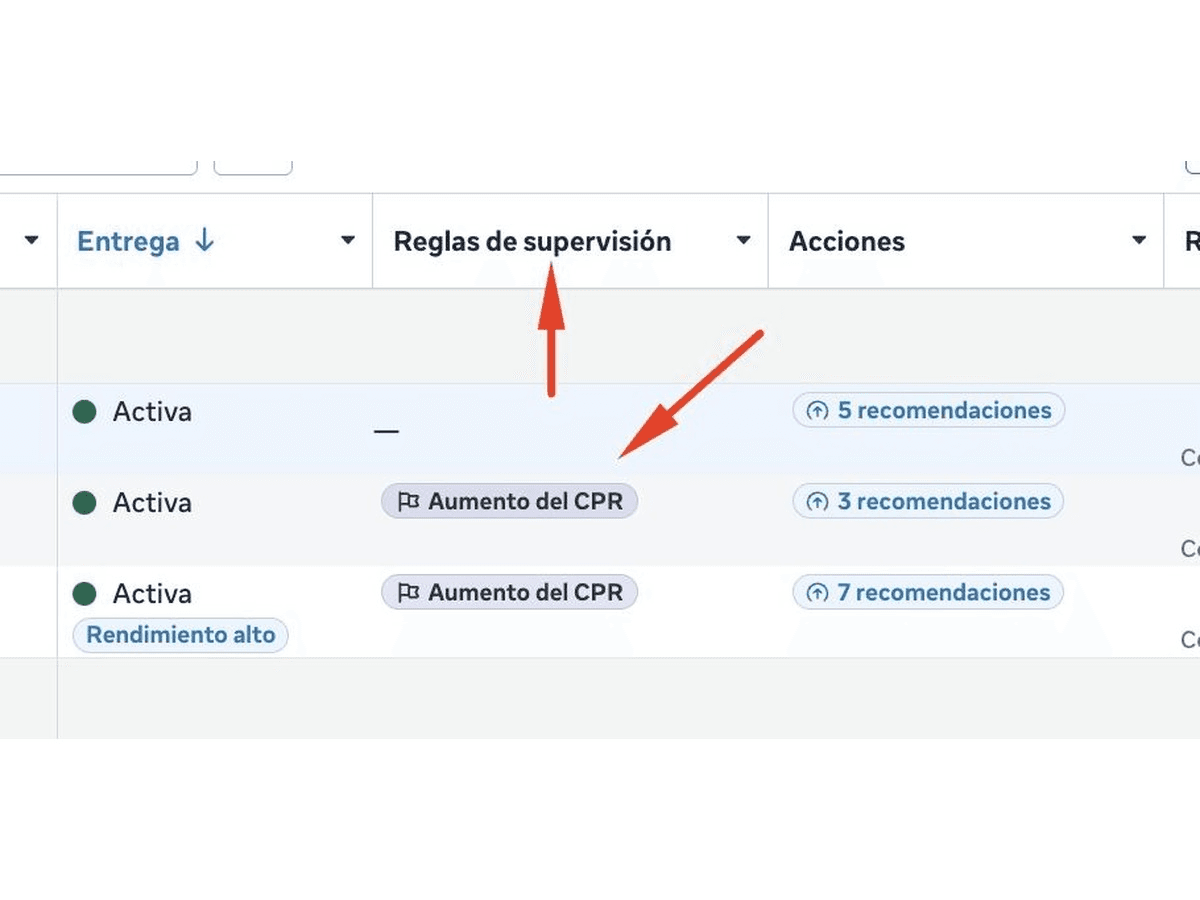
Matias Axel Ramayo reports a “Monitoring rules” column in Meta Ads Manager’s campaigns table. It reportedly shows triggered alerts, including rising cost per result or falling return on ad spend, without requiring users to open each campaign. The associated rules can reportedly be edited.
No Meta documentation was identified in the available material. The report therefore supports an account-level observation, not a conclusion about general availability, default thresholds, rollout priority or the exact calculation and comparison logic behind each alert.
Validate the rule before acting
If the column appears, inspect each rule before treating its alert as an instruction. As an editorial suggestion, record the metric, threshold, comparison period, attribution context and intended response. A falling ROAS alert has limited operational meaning unless the conversion, value and comparison definitions are also understood.
A useful test would select several triggered and untriggered campaigns, compare the displayed state with their underlying data and determine whether the rule behaves consistently. Include campaigns with different volumes, because a percentage movement based on little data may deserve a different response from the same movement in a mature campaign.
The column may make triage faster, but visibility should not replace diagnosis. Log any rule edit and the reason for each material action taken after an alert. If the observed calculation cannot be reconciled, treat the alert as unresolved rather than changing budget or delivery solely because it appears in the table.
Why it matters for advertisers
At-a-glance alerts may shorten campaign triage, but unknown or poorly chosen thresholds can create false urgency. Rule transparency determines whether the column supports reliable decisions.
What to check next
- Inspect every visible Monitoring rule’s metric, period, threshold and attribution context before use.
- Compare triggered alerts with underlying campaign data across both low- and higher-volume campaigns.
- Log rule edits and any material campaign action attributed to an alert.
Sources & contributor credit
- Reporting or practitioner sourceMatias Axel Ramayo on LinkedIn
Source cited in the published Week 40 newsletter. Article observation/reporting date is shown separately; this page’s original publication date is not inferred.
- Newsletter coverage · Paid Media Collective Week 40
Published edition used for story selection, copy, source credits and media; curation is distinct from original authorship.

Original creator unverified
Contributor roles follow the published newsletter and its linked evidence. Reporting, official discussion and visual authorship are kept separate; no independently unverified first-reporting priority is awarded.
Attribution evidence and limitations
Published story and credit line reconciled with the expanded article.
Original post, primary documentation and secondary reporting links retained.
Visible image content inspected for story relevance; image credit retained separately from reporting credit.
Attribution checked . This is a review date, not the original publication date.
- Published on this site
- Article updated
This update reflects the dated source reporting. Availability may have changed. Further coverage of this same development will be added to this page.