Google Business Profile · Status at source date: Account observation
A business-photo verification option appears in Google profiles
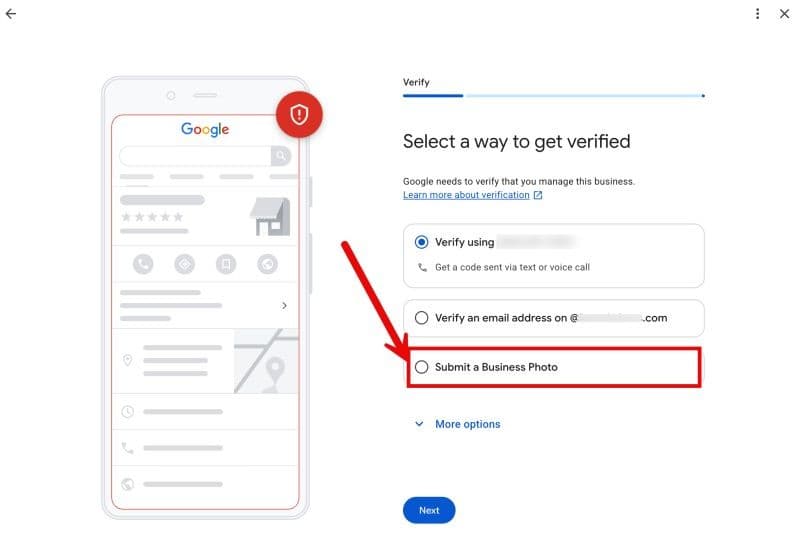
Ben Fisher shared a Google Business Profile verification screen offering “Submit a business photo”, with requirements for the business name on a permanent fixture and the storefront in one frame.
What changed
Ben Fisher’s LinkedIn post reports a Google Business Profile verification choice labelled Submit a Business Photo. Search Engine Roundtable links his observation and later adds the photo requirements: the business name should appear on a permanent fixture and the whole storefront should be visible in one frame. The retained screenshot confirms that this choice appeared beside other verification methods on the captured screen.
The evidence supports an account observation. It does not establish a universal launch or prove that photo verification was entirely new, and the historical newsletter records another practitioner’s prior experience with it. Fisher also raises questions about whether Google could combine the image with location information and other signals. Those questions are hypotheses about the review process, not a verified explanation of how Google approves a submission.
Why it matters for advertisers
PMC analysis: the operational opportunity is to prepare location staff for the evidence actually requested in their profile. A clear picture of permanent signage and the storefront can be harder to obtain quickly than it sounds if an agency does not have someone on site or a business shares a building. Identifying an appropriate contact and reviewing the instructions before taking the photo should reduce avoidable resubmissions.
For an advertiser managing several locations, avoid turning one screenshot into a standard instruction for every branch. A location checklist can record which verification method is offered and who can provide the required evidence. That creates a useful distinction between a branch awaiting a photograph and one that needs a different verification process. It also prevents an unconfirmed interface observation from becoming a promise to the client about approval speed or success.
What to check next
- Open the specific location’s verification flow and record the methods it offers. Use the photo route only where it is presented.
- If requested, arrange an image showing the permanent business name and the full storefront together, following the exact on-screen instructions.
- Retain the submission outcome and any further requests. Escalate unresolved location-specific issues without assuming that the photograph replaces every other verification method.
Sources & contributor credit
- Newsletter coverage · Paid Media Collective newsletter
Original newsletter text, contributor labels and media for this update.
- Source referenced in newsletterLinkedIn
Linked from the original newsletter. The source publication date has not been independently confirmed.
- Source referenced in newsletterSearch Engine Roundtable
Linked from the original newsletter. The source publication date has not been independently confirmed.

Source attribution checked
Ben Fisher is the confirmed author of the inspected observation; Barry Schwartz is the subsequent reporter. Historical first-contributor label is preserved as newsletter history, without asserting timestamp priority or unknown screenshot authorship.
Attribution evidence and limitations
Read Ben Fisher’s full cached LinkedIn post text and Search Engine Roundtable article body including its update. Underlying process speculation is separated from observation. The archive’s novelty caveat is retained; no first-observer assertion added.
Preserved original source/profile links and historical contributor label. Roundtable links a share-form version of Fisher’s post with a different URL; both point to the named observation but timestamp priority is not inferred.
Viewed web/public/news/newsletter/google-business-profile-business-photo-verification.jpg. It shows 'Submit a Business Photo' with a red arrow/outline and blurred contact options. No personal watermark. It does not show the later photo-requirements screen, whose requirements are attributed to the reporting text.
- Read original author’s cached post; observation and proposed mechanism are distinct.
- Read body and update; explicitly credits Ben Fisher and specifies signage/storefront requirements.
Attribution checked . This is a review date, not the original publication date.
- Published on this site
- Article updated
This update reflects the dated source reporting. Availability may have changed. Further coverage of this same development will be added to this page.
Original newsletter text and archive evidence
A business-photo verification option appears in Google profiles
Ben Fisher shared a Google Business Profile verification screen offering “Submit a business photo”, with requirements for the business name on a permanent fixture and the storefront in one frame. Its novelty and rollout status remain unconfirmed, with another practitioner reporting prior experience of photo verification. For you, this means checking the methods offered to each location and preparing the requested evidence where this option appears.
Source captured . First-contributor labels follow the newsletter’s explicit wording.