Microsoft Advertising · Status at source date: Newsletter archive
Google Products tab now shows per-campaign performance breakdown
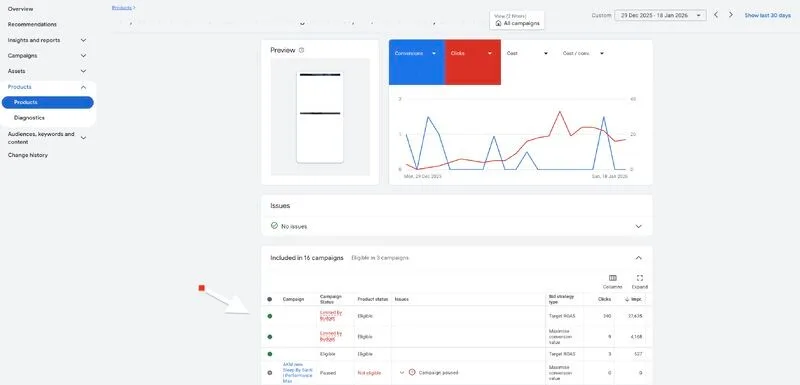
Google Ads now lets you click a product title under the Products tab to see every campaign where that product is active and how it performs in each. You can compare performance between Standard Shopping and Performance Max at the product level.
Why it matters for advertisers
For you, this means you can spot where spend overlaps on the same product and decide where to scale based on real product-level data.
Perspective from the original PMC newsletter.Sources & contributor credit
- Newsletter coverage · Paid Media Collective newsletter
Original newsletter text, contributor labels and media for this update.
- Source referenced in newsletterLinkedIn
Linked from the original newsletter. The source publication date has not been independently confirmed.
Original creator unverified
The names below are source credits. The original creator and first-reporting priority have not yet been independently verified.
Attribution evidence and limitations
Full attribution review pending.
A source link alone does not establish original authorship.
Original image and video creators have not yet been verified.
- Published on this site
This update reflects the dated source reporting. Availability may have changed. Further coverage of this same development will be added to this page.
Original newsletter text and archive evidence
Google Products tab now shows per-campaign performance breakdown
Google Ads now lets you click a product title under the Products tab to see every campaign where that product is active and how it performs in each. You can compare performance between Standard Shopping and Performance Max at the product level. For you, this means you can spot where spend overlaps on the same product and decide where to scale based on real product-level data.
Source captured . No explicit first-contributor label was provided for this update.