Google Ads · Status at source date: Newsletter archive
Chrome DevTools now explains Google Ads disapprovals and console errors with Gemini AI
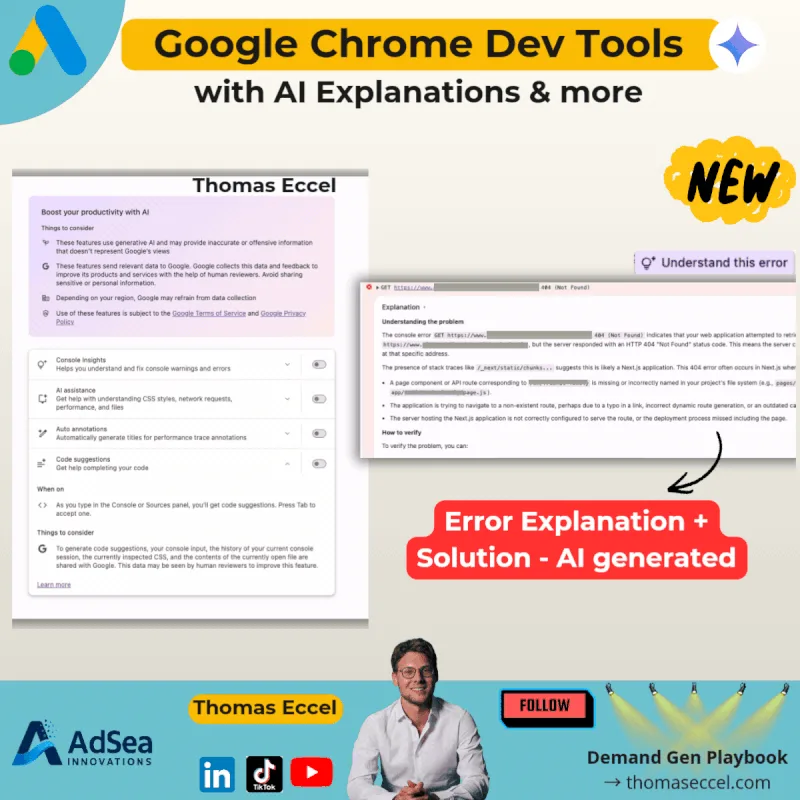
Thomas Eccel has highlighted that Google Chrome DevTools now includes built-in Gemini AI features accessible via Settings → AI Innovations. The tooling includes an "Understand this error" button that breaks down console errors in plain language, AI-generated explanations for failed requests and warnings, code suggestions inside the Sources panel, and AI assistance for CSS styles, network requests, and performance issues.
What changed
Eccel notes the practical application for PPC practitioners: when Google Ads flags a landing page issue such as "Destination not working," Chrome DevTools can now explain the underlying error and suggest what needs to be fixed: without requiring developer expertise.
Why it matters for advertisers
For you, this means enabling Gemini AI features in Chrome DevTools (Settings → AI Innovations) before your next landing page troubleshooting session: the plain-language error explanations make cross-functional communication with developers significantly faster.
Perspective from the original PMC newsletter.Sources & contributor credit
- Newsletter coverage · Paid Media Collective newsletter
Original newsletter text, contributor labels and media for this update.
- Source referenced in newsletterLinkedIn
Linked from the original newsletter. The source publication date has not been independently confirmed.

Original creator unverified
The names below are source credits. The original creator and first-reporting priority have not yet been independently verified.
Attribution evidence and limitations
Full attribution review pending.
A source link alone does not establish original authorship.
Original image and video creators have not yet been verified.
- Published on this site
This update reflects the dated source reporting. Availability may have changed. Further coverage of this same development will be added to this page.
Original newsletter text and archive evidence
Chrome DevTools now explains Google Ads disapprovals and console errors with Gemini AI
Thomas Eccel has highlighted that Google Chrome DevTools now includes built-in Gemini AI features accessible via Settings → AI Innovations. The tooling includes an "Understand this error" button that breaks down console errors in plain language, AI-generated explanations for failed requests and warnings, code suggestions inside the Sources panel, and AI assistance for CSS styles, network requests, and performance issues. Eccel notes the practical application for PPC practitioners: when Google Ads flags a landing page issue such as "Destination not working," Chrome DevTools can now explain the underlying error and suggest what needs to be fixed: without requiring developer expertise.
For you, this means enabling Gemini AI features in Chrome DevTools (Settings → AI Innovations) before your next landing page troubleshooting session: the plain-language error explanations make cross-functional communication with developers significantly faster.
Source captured . No explicit first-contributor label was provided for this update.