Google Ads · Status at source date: Spotted in the Wild
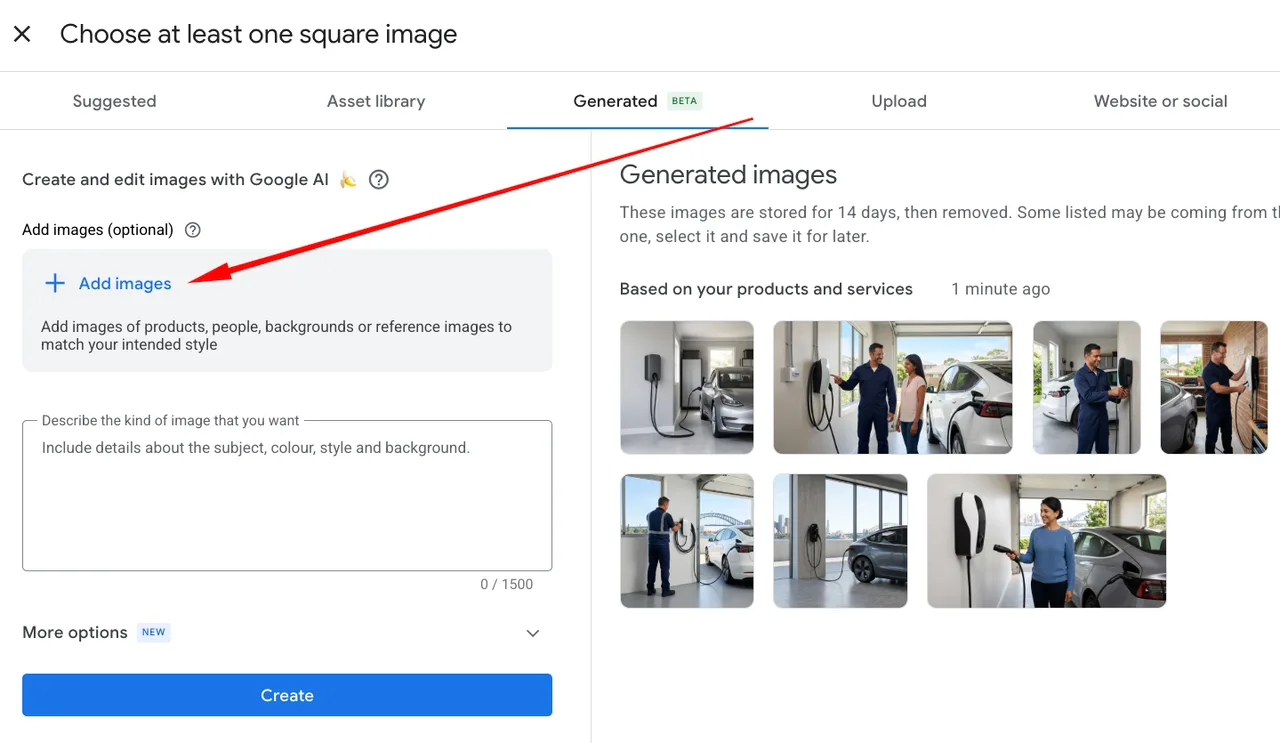
Google Ads image picker offers a scan of another website or social profile
Arpan Banerjee shared a Google Ads image-picker screenshot showing an option to scan another website or social media profile. His original LinkedIn post is dated 15 October from its activity timestamp. The supplied image shows the option in the asset-selection interface; it does not demonstrate the quality of returned images or establish availability in every account.

What changed
The observation is useful for teams sourcing approved creative from more than one owned destination. It suggests an additional discovery route inside the image-selection workflow. It should not be read as permission to reuse any image found on a website or social account, nor as confirmation that every social platform is supported.
PMC credits Arpan for the original account observation reviewed here. This is not a claim of first-ever discovery across every source. Google is the platform being observed; the screenshot and report belong to the practitioner’s evidence chain rather than a dated Google launch announcement.
For a practical check, use a destination controlled by the advertiser and compare the results with its approved asset library. Review whether the returned files are current, sufficiently clear and appropriate for the intended placement. An image can belong to the brand yet still contain an expired offer, outdated packaging or text that no longer matches the landing page.
Keep the original source and approval record with any selected asset. If the image features a partner, creator or licensed photograph, confirm that the planned advertising use is covered by the existing agreement. Discovery inside an advertising tool does not settle those usage questions.
The next step for an account where the option appears is a small workflow test: record the date and interface, inspect the available destinations and assess the resulting assets before attaching them to a campaign. If it is absent elsewhere, retain that difference as an availability observation. The evidence currently supports an interface option spotted in an account, rather than a universal rollout or a proven improvement in creative performance.
Sources & contributor credit
- Original reporting · Arpan Banerjee
Original LinkedIn post timestamp derived from activity ID; account observation, not rollout date.
Original creator unverified
Credits reflect the editor's latest changes. Original authorship has not been independently verified for this version.
Attribution evidence and limitations
Full attribution review pending.
A source link alone does not establish original authorship.
Original image and video creators have not yet been verified.
- Published on this site
- Article updated
This update reflects the dated source reporting. Availability may have changed. Further coverage of this same development will be added to this page.