Google Ads API · Status at source date: Catch-up · release 2 November · documentation updated 13 November
Google's official Google Ads MCP server can now create assets and labels through a propose-and-confirm flow
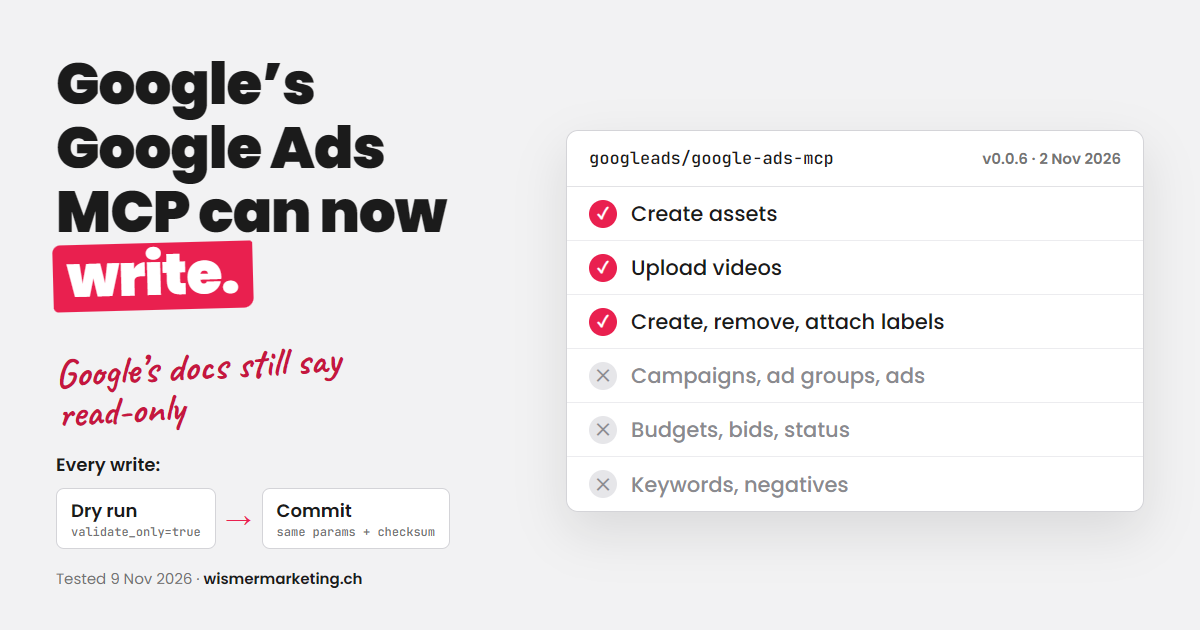
Version 0.0.6 of the google-ads-mcp server, released on 2 November, adds four write tools: create text, image, YouTube video, sitelink, callout and structured-snippet assets; upload videos to YouTube in local mode; and create, update and apply labels to campaigns, ad groups and criteria.
What changed
Every change runs as a validate-only proposal with a checksum that the user confirms; it still cannot create or edit campaigns, ad groups, ads, budgets, bids, keywords or statuses. Google's developer page was updated on 13 November from "read only" to "Read and partial mutate". Thomas Wismer published a signed walkthrough on 9 November; this establishes his original report, while wider first-reporting priority remains unverified. For you, this means an AI assistant can now label and populate assets in a live account, so decide who may confirm proposals before enabling the write tools.
The propose-and-confirm flow is a meaningful boundary between preparing an account change and applying it. An assistant can assemble a proposed asset or label, but the person reviewing the proposal still needs to check the content, destination and account context. A successful connection to the server does not make an automatically generated proposal correct.
Begin with a narrowly defined task, such as preparing a label for a known reporting workflow. Confirm which account and resource the proposal affects, then compare the proposed result with the original request. Keep the confirmation step visible to the operator instead of treating it as an administrative detail to automate away.
For assets, review factual claims, offer terms, spelling and landing-page consistency before confirming. For labels, agree the naming convention and intended reporting use so that an assistant does not create near-duplicate labels that fragment analysis. The ability to write a resource should not be confused with a recommendation to reorganise an account.
Teams evaluating the server should distinguish read access from write capabilities and document the permissions used for the workflow. Maintain a record of approved changes and verify the result in Google Ads. The release expands the server's operational scope; it is not evidence that every agent has the same permissions or that campaign changes can safely be published without review.
Why it matters for advertisers
Version 0.0.6 of the google-ads-mcp server, released on 2 November, adds four write tools: create text, image, YouTube video, sitelink, callout and structured-snippet assets; upload videos to YouTube in local mode; and create, update and apply labels to campaigns, ad groups and criteria.
Sources & contributor credit
- Original source · Thomas Wismer’s original article
Source retained from the reviewed final Week 46 edition.
- Supporting sourceGitHub release
Source retained from the reviewed final Week 46 edition.
- Supporting sourceGoogle developer documentation
Source retained from the reviewed final Week 46 edition.

Original creator unverified
Credits reflect the editor's latest changes. Original authorship has not been independently verified for this version.
Attribution evidence and limitations
Full attribution review pending.
A source link alone does not establish original authorship.
Original image and video creators have not yet been verified.
- Published on this site
- Article updated
This update reflects the dated source reporting. Availability may have changed. Further coverage of this same development will be added to this page.