Industry · Status at source date: Newsletter archive
Shopify enables "optimised" pixel data sharing by default
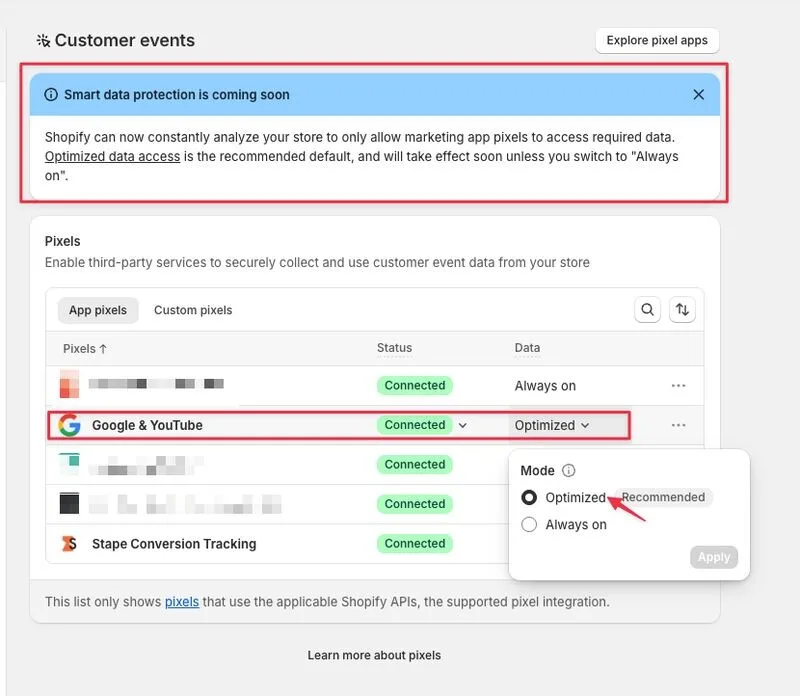
Shopify has changed the default behaviour for sharing marketing pixel data. The platform now monitors attribution signals and may automatically suspend data sharing for pixels that don't show active signals, without warning.
What changed
The setting is enabled by default as "Optimised" rather than "Always On." This particularly affects secondary channels like TikTok or Snapchat, where spending may be paused. To revert: Settings > Customer events > App pixels > Data > change to "Always On." Currently applies only to App Pixels, not Custom Pixels.
Why it matters for advertisers
For you, this means checking pixel settings immediately if you rely on native Shopify app pixels, as data may stop flowing without notice.
Perspective from the original PMC newsletter.Sources & contributor credit
- Newsletter coverage · Paid Media Collective newsletter
Original newsletter text, contributor labels and media for this update.
- Source referenced in newsletterLinkedIn
Linked from the original newsletter. The source publication date has not been independently confirmed.

Original creator unverified
The names below are source credits. The original creator and first-reporting priority have not yet been independently verified.
Attribution evidence and limitations
Full attribution review pending.
A source link alone does not establish original authorship.
Original image and video creators have not yet been verified.
- Published on this site
This update reflects the dated source reporting. Availability may have changed. Further coverage of this same development will be added to this page.
Original newsletter text and archive evidence
Shopify enables "optimised" pixel data sharing by default
Shopify has changed the default behaviour for sharing marketing pixel data. The platform now monitors attribution signals and may automatically suspend data sharing for pixels that don't show active signals, without warning. The setting is enabled by default as "Optimised" rather than "Always On." This particularly affects secondary channels like TikTok or Snapchat, where spending may be paused. To revert: Settings > Customer events > App pixels > Data > change to "Always On." Currently applies only to App Pixels, not Custom Pixels. For you, this means checking pixel settings immediately if you rely on native Shopify app pixels, as data may stop flowing without notice.
Source captured . No explicit first-contributor label was provided for this update.