Amazon Ads · Status at source date: Announcements
Amazon expands Responsive eCommerce Creative with video, carousels and Alexa prompts
Amazon has added in-banner video, multi-image carousels and Alexa for Shopping prompts to Responsive eCommerce Creative, with availability varying by feature.
What changed
More responsive creative components
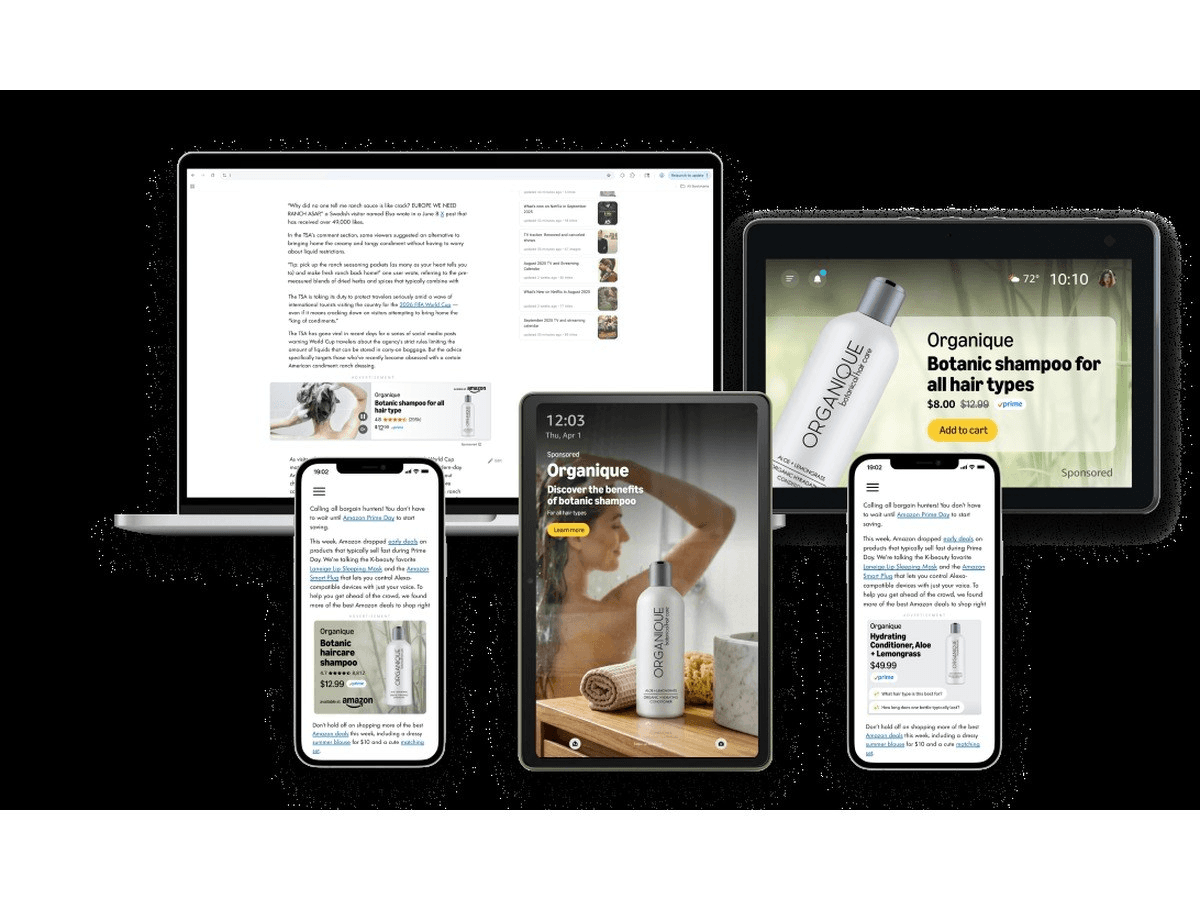
Amazon has expanded Responsive eCommerce Creative with in-banner video, multi-image carousels and Alexa for Shopping prompts, alongside brand controls and creative previews. This is a display-creative update and is separate from the Ads Data Manager redesign.
Availability differs by capability and market. The announcement identifies brand identity controls as US-only while listing broader access for other functions. It would therefore overstate the information to claim that every component is available in every market or that one market’s access establishes the full feature set elsewhere.
Inspect the rendered result by market
Create a capability-by-market checklist before creative production begins. Separate access to video, carousel, Alexa prompts, previews and brand identity controls so the brief reflects what can actually be activated for the intended market.
Use available previews to inspect asset order, legibility, product presentation and the meaning retained in each relevant rendering. Video and carousel content should communicate coherently if only part of the sequence is noticed, while an Alexa for Shopping prompt should be reviewed in the context in which it appears. Generated or assembled output still needs normal brand and accuracy approval.
A useful test would take one representative product and document how each permitted component renders across the campaign’s intended placements. Record any truncation, unexpected ordering or inconsistent brand treatment, then decide whether a simpler asset set communicates more reliably. More components do not automatically make a stronger creative.
Why it matters for advertisers
Additional components broaden the ways products can be presented, but uneven market availability and responsive rendering create new briefing and quality-control decisions. Previewing is part of production, not an optional final check.
What to check next
- Build a feature-by-market availability checklist before briefing or producing assets.
- Use previews to inspect every relevant rendering for order, legibility and product accuracy.
- Apply normal brand and claims review to generated or assembled creative before activation.
Sources & contributor credit
- Original sourceAmazon Ads What's New: Responsive e-commerce Creative
Source cited in the published Week 40 newsletter. Article observation/reporting date is shown separately; this page’s original publication date is not inferred.
- Newsletter coverage · Paid Media Collective Week 40
Published edition used for story selection, copy, source credits and media; curation is distinct from original authorship.

Original creator unverified
Contributor roles follow the published newsletter and its linked evidence. Reporting, official discussion and visual authorship are kept separate; no independently unverified first-reporting priority is awarded.
Attribution evidence and limitations
Published story and credit line reconciled with the expanded article.
Original post, primary documentation and secondary reporting links retained.
Visible image content inspected for story relevance; image credit retained separately from reporting credit.
Attribution checked . This is a review date, not the original publication date.
- Published on this site
- Article updated
This update reflects the dated source reporting. Availability may have changed. Further coverage of this same development will be added to this page.