Google Ads · Status at source date: Spotted in the Wild
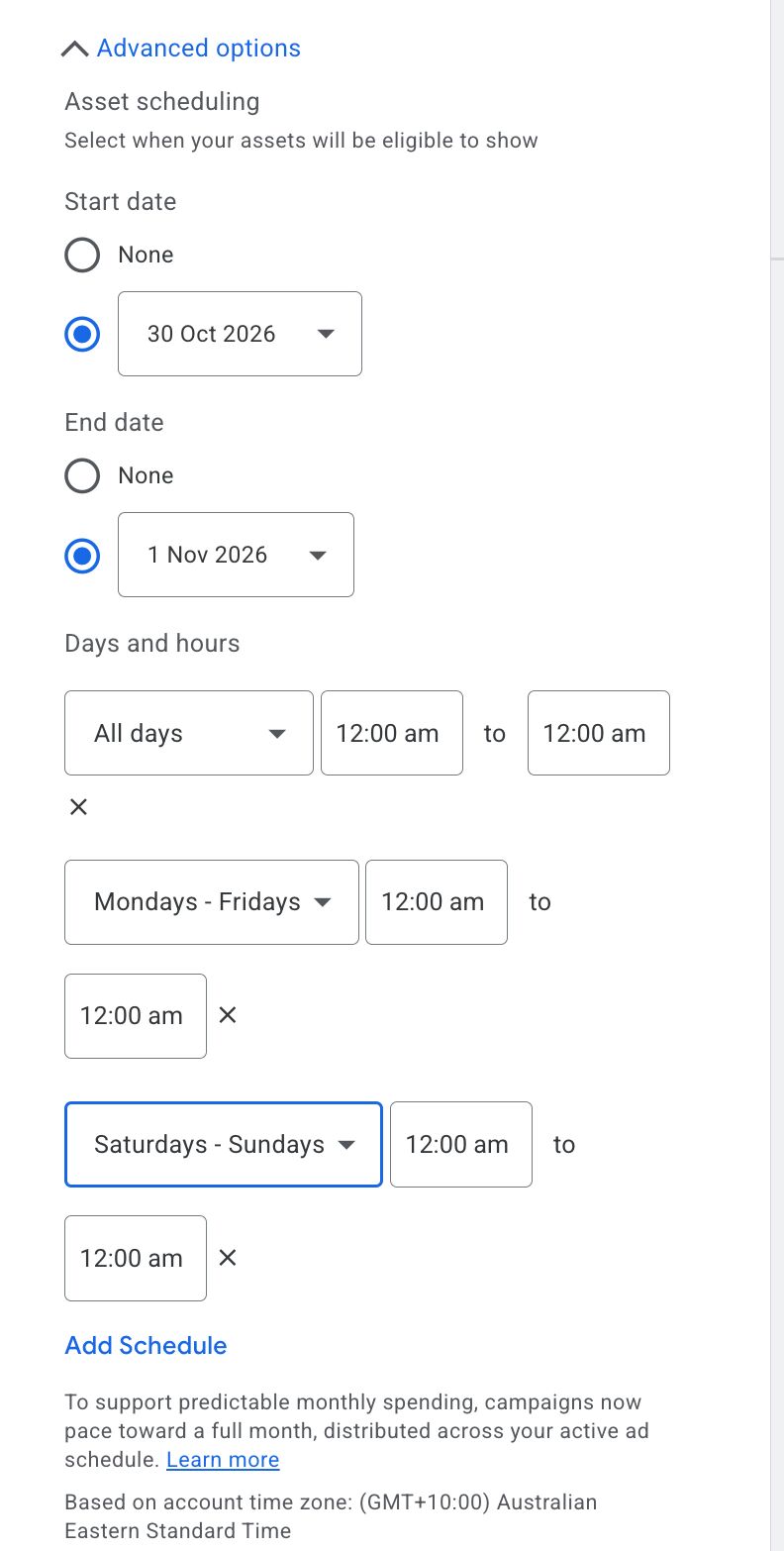
Asset scheduling shows weekday and weekend presets
Bia Camargo reports day-range presets and multiple schedules within asset scheduling. The visible choices can simplify weekday-only assets or weekend offers, where available.
What changed
Check the asset schedule alongside the campaign's ad schedule and the offer's actual validity period. Availability may vary by account.
Asset scheduling controls when a particular asset is eligible to appear. A weekday or weekend preset can reduce repetitive setup, but it does not replace the campaign's own serving schedule or the dates on an offer. The observation concerns the scheduling interface shown in Bia Camargo's account, not a new guarantee of delivery on every selected day.
Consider a restaurant using one asset for a weekday lunch offer and another for weekend bookings. The useful check is whether each asset's selected days match the offer on the landing page. If the campaign is paused or otherwise ineligible during that period, selecting the asset schedule cannot make it serve. Conversely, a valid campaign schedule does not make an expired offer accurate.
Before changing several assets, inspect one setup and record the relevant account time zone, selected day ranges and any overlapping schedules. Compare the settings with the business's actual opening hours and the promotion's conditions. Multiple schedules can be helpful, but an overlap or mistaken day selection can make a configuration harder to audit.
The evidence does not show that existing schedules were automatically rewritten. Nor does it establish that the same presets are present in every account or for every asset type. Preserve a screenshot of the controls actually available and check the resulting settings after saving an authorised change.
This is a Week 44 account observation. The exact original posting day remains unresolved, so the article does not substitute its upload date for the observation date. The source credit belongs to Bia Camargo; the image illustrates the interface she reported.
Sources & contributor credit
- Original postLinkedIn
Source retained from Yoann Ferrand’s final Week 44 edition.


Original creator unverified
Credits reflect the editor's latest changes. Original authorship has not been independently verified for this version.
Attribution evidence and limitations
Full attribution review pending.
A source link alone does not establish original authorship.
Original image and video creators have not yet been verified.
- Published on this site
- Article updated
This update reflects the dated source reporting. Availability may have changed. Further coverage of this same development will be added to this page.