Google Ads · Status at source date: Reported rollout
Google Ads expands AI performance summaries above the campaign table
AI-written performance summaries are appearing above the Google Ads campaign table to highlight changes and suggest follow-up questions.
What changed
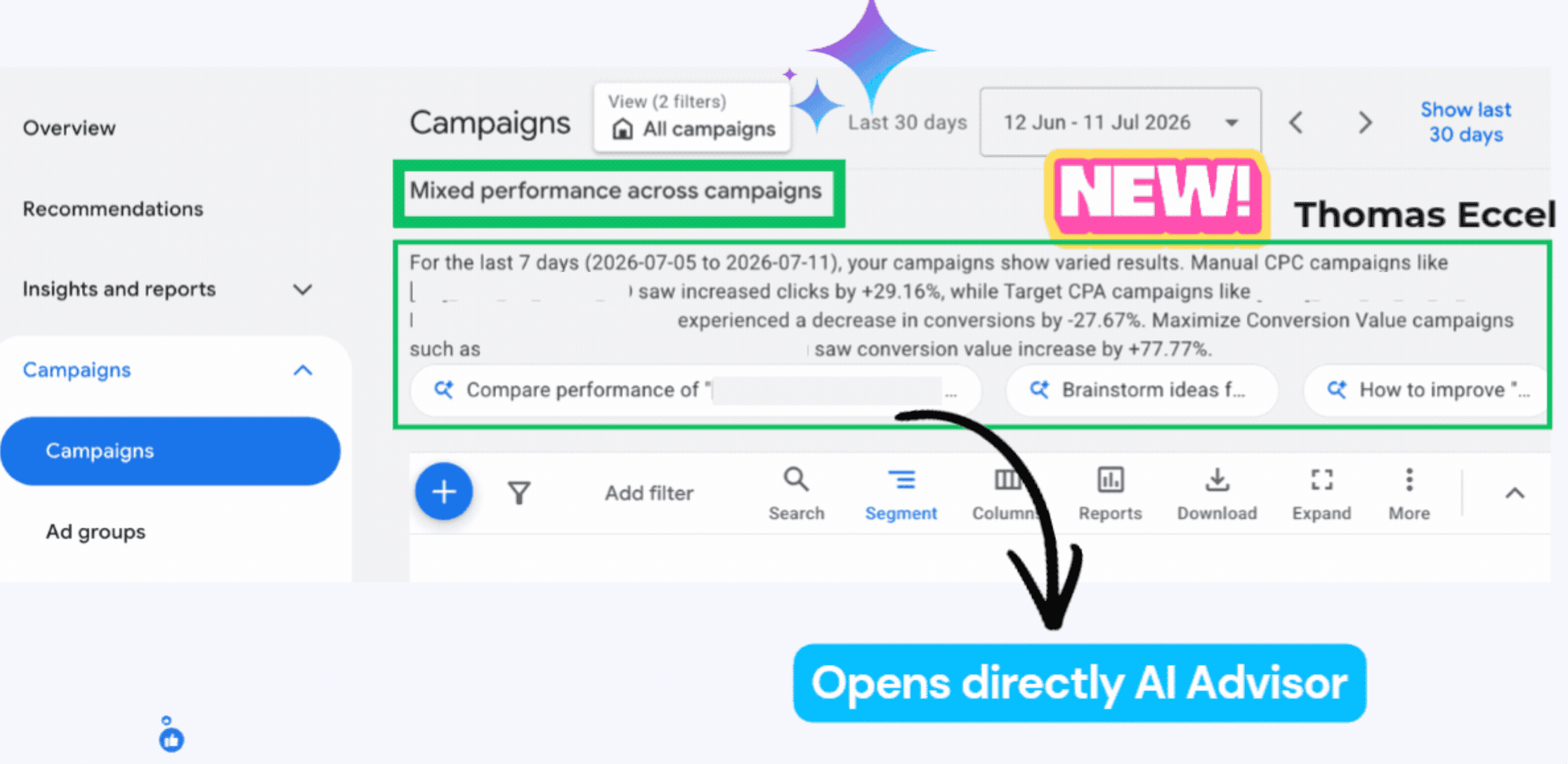
Thomas Eccel observed AI-written performance summaries above the Google Ads campaign table. His screenshot shows a short account narrative and suggested follow-up prompts that open AI Advisor. The examples describe movements in clicks, conversions and conversion value, grouped partly by bidding strategy. This can provide a starting point for an account review, especially when a team is deciding which campaigns need attention first.
The screenshot illustrates why the comparison period needs checking. Its main date selector shows a 30-day range, while the generated narrative explicitly refers to the last seven days. Those two views can answer different questions. Before carrying a percentage into a client report, identify the period the sentence uses, the comparison baseline and the campaigns included. A correct number can still be misleading when presented as a different comparison.
The explanation also needs to be separated from the diagnosis. More clicks in a Manual CPC campaign and fewer conversions in a target CPA campaign do not, by themselves, show that one bidding strategy caused the difference. Different offers, audiences, budgets and conversion delays can contribute. Use the summary to locate the underlying rows, then investigate the account changes and business context around them.
Why it matters for advertisers
A concise narrative is easy to reuse, which makes verification especially valuable before it reaches a stakeholder. Trace the main statement back to the campaign data and inspect absolute volumes as well as percentages. A large percentage movement from a small base may deserve less attention than a modest shift in a high-volume campaign. Add the explanation the business actually needs, including what is known, what remains uncertain and whether any action is justified.
What to check next
- Match the narrative’s date range and campaign scope to the underlying report.
- Check absolute changes and conversion lag before interpreting percentages.
- Use AI Advisor prompts to investigate, then verify the explanation before changing campaigns.
Sources & contributor credit
- Newsletter coverage · Paid Media Collective newsletter
Original newsletter text, contributor labels and media for this update.
- Source referenced in newsletterLinkedIn
Linked from the original newsletter. The source publication date has not been independently confirmed.

Original creator unverified
The cited source authors and any separately identified visual or tool creators are credited for their documented roles. Independent first-reporting priority is not established.
Attribution evidence and limitations
Read Thomas Eccel’s full original post and visually inspected the campaign-summary screenshot. Identified the explicit seven-day narrative beside a 30-day date selector and added an original comparison-period check. No bidding-strategy causality or universal rollout was inferred.
Original source links and verified profile links are retained. A missing profile remains unresolved rather than being inferred from a name match.
Viewed the annotated screenshot carrying Thomas Eccel’s name. It shows the summary, periods and Advisor prompts described in his post. No other person is named as an original source or visual creator.
Attribution checked . This is a review date, not the original publication date.
- Published on this site
- Article updated
This update reflects the dated source reporting. Availability may have changed. Further coverage of this same development will be added to this page.
Original newsletter text and archive evidence
AI performance explanations expand in the campaigns view.
Google Ads is showing more AI-written performance summaries directly above the campaign table. They cover click changes, conversion drops broken down by bid strategy, and conversion-value shifts, with suggested prompts that open the AI chat. For you, this means a faster read on what moved in an account, so treat the summaries as a starting point and verify the numbers before acting.
Source captured . No explicit first-contributor label was provided for this update.