Google Ads · Status at source date: Account observation
Google Ads lead forms show qualifying-answer controls
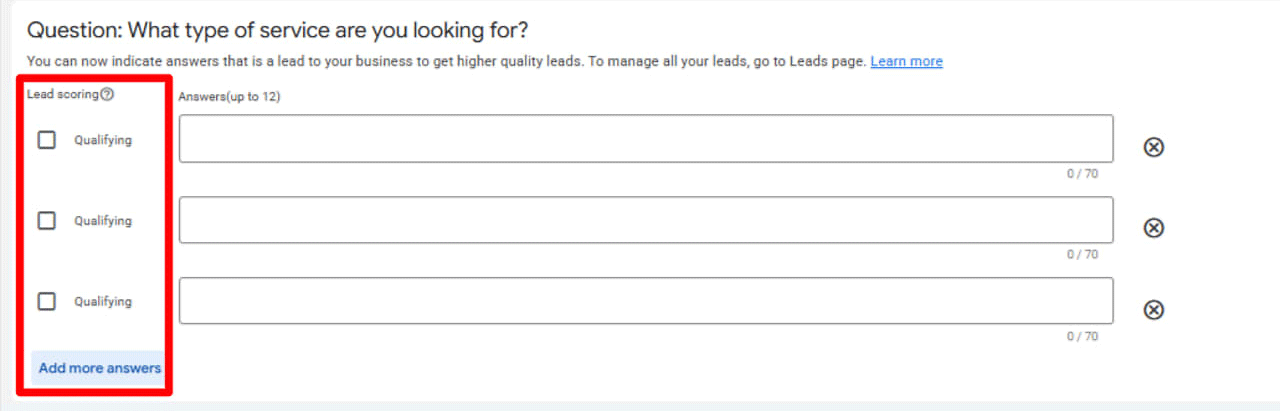
A screenshot-based observation indicates that some Google Ads lead-form builders now display qualifying checkboxes beside custom-question answers.
What changed
What the evidence shows: an inspected screenshot of a Google Ads lead-form question builder displays a “Lead scoring” column and Qualifying checkboxes beside possible answers. The interface allows up to 12 answers for a question. Secondary coverage describes the path as Assets > Lead Form > Create Lead Form > Custom Questions. The observation does not establish numerical scoring, bid optimisation, conversion-reporting effects, connection to a Leads beta, or availability across accounts. The original observation date is unknown. Search Engine Roundtable’s later coverage is dated 16 October, while PPC News Feed published coverage dated 15 October.
PMC advertiser perspective: this is potentially useful because it could let advertisers signal which submitted answers represent a commercially appropriate enquiry before a sales team receives the lead. That is a qualification workflow question, not evidence that Google will value, price or optimise traffic differently.
A practical hypothetical: a home-improvement advertiser asks whether a visitor owns the property, has an installation timescale within three months, and is in a serviceable postcode. It might mark favourable answer options as qualifying, then compare the proportion of sales-accepted leads before and after using the form configuration. It should not assume that the setting changes campaign bidding or reported conversion value.
Advertisers should first check whether the control appears in the specific account, campaign and lead-form flow they use. If it does, record the exact question wording, answer choices and export fields before publishing. Sales teams should agree what “qualified” means independently of the interface label, and reconcile form submissions against CRM disposition data. A small test should watch lead volume, completion rate, contactability, appointment rate and eventual revenue quality. If reporting surfaces a new classification, confirm its definition from Google documentation before treating it as a KPI.
The important restraint is that a checkbox visible in one interface is evidence of a configuration possibility, not evidence of a universally available scoring system. Until documentation clarifies reporting and optimisation behaviour, this is best approached as a lead-capture design observation.
Why it matters for advertisers
Advertisers may be able to make lead forms more useful to sales teams, but the observed control does not prove any bidding, scoring or reporting outcome.
What to check next
- Check whether the controls appear in the relevant account and lead-form workflow.
- Define qualification criteria with the sales team before changing form questions.
- Measure CRM outcomes separately from Google Ads interface labels.
Sources & contributor credit
- Secondary coverageSearch Engine Roundtable
Secondary coverage date only; original publication, revision and launch dates unresolved. Reported original observer explicitly credited via Hana Kobzová and Barry Schwartz. Original post and chronological priority unresolved.
- Discovery source · PPC News Feed
Secondary discovery; not proof of feature launch.

Original creator unverified
Credits reflect the editor's latest changes. Original authorship has not been independently verified for this version.
Attribution evidence and limitations
Full attribution review pending.
A source link alone does not establish original authorship.
Original image and video creators have not yet been verified.
- Published on this site
- Article updated
This update reflects the dated source reporting. Availability may have changed. Further coverage of this same development will be added to this page.