Google Ads · Status at source date: Account observation
Customer retention settings can be changed across many campaigns in one panel
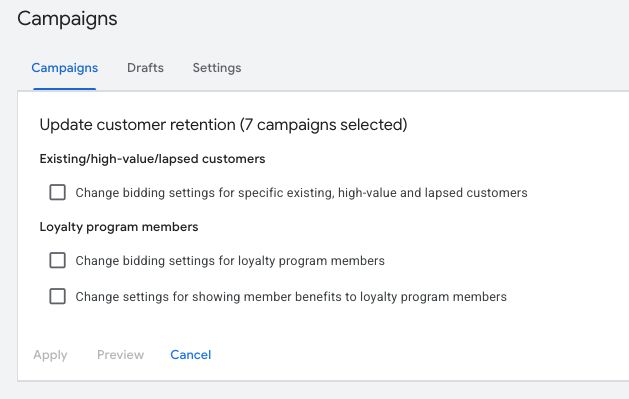
Bia Camargo found a bulk-edit panel for customer lifecycle settings: in one place you can change how bidding treats existing, high-value and lapsed customers and loyalty members across several campaigns, preview the change and apply it, where each campaign previously had to be edited on its own.
What changed
It arrives alongside the Editor 2.14 retention controls above and last week's new-customer-only option on Manual CPC. For you, this means a retention strategy can be rolled across an account in minutes, so decide the lapsed-customer bid before someone applies the preview.
A shared editing panel can save time, but it also increases the number of campaigns affected by one confirmation. The screenshot's seven selected campaigns are an example of the workflow, not a recommended batch size. Review the selection itself before reviewing the retention values.
Existing customers, loyalty-member bidding and member benefits are separate inputs in the observed panel. Confirm that the underlying customer definitions and loyalty information are appropriate for every campaign in the selection. A setting that suits a retention campaign may not suit another campaign with a different acquisition or commercial objective.
Before applying a bulk change, record the intended values and identify any campaigns that need an exception. After saving, inspect representative campaigns and verify that the settings landed where expected. A bulk-edit interface reduces repetitive work; it does not remove the need to check the resulting account configuration.
Bia Camargo's account observation establishes that the panel was visible in the reviewed account. It does not establish universal access or independently measured improvements in retention. The useful takeaway is operational: when the panel is available, use it with a deliberate campaign selection and a clear owner for the customer and loyalty data behind the settings.
Why it matters for advertisers
Bia Camargo found a bulk-edit panel for customer lifecycle settings: in one place you can change how bidding treats existing, high-value and lapsed customers and loyalty members across several campaigns, preview the change and apply it, where each campaign previously had to be edited on its own.
Sources & contributor credit
- Original source · LinkedIn
Reviewed original source retained from the final Week 46 edition.


Original creator unverified
Credits reflect the editor's latest changes. Original authorship has not been independently verified for this version.
Attribution evidence and limitations
Full attribution review pending.
A source link alone does not establish original authorship.
Original image and video creators have not yet been verified.
- Published on this site
- Article updated
This update reflects the dated source reporting. Availability may have changed. Further coverage of this same development will be added to this page.